How To start
We offer three types of integration:
- API — a fully flexible and customizable integration through our REST API.
- Web Widget — an embeddable JavaScript widget that handles the entire purchase flow with just a few lines of code.
- Iframe — the quickest and simplest setup via an iframe block, ready in minutes on both desktop and mobile.
A short registration form must be completed before integration, regardless of which option you choose.
-
Fill the partner form
Fill out the partner form on the website – Become Partner
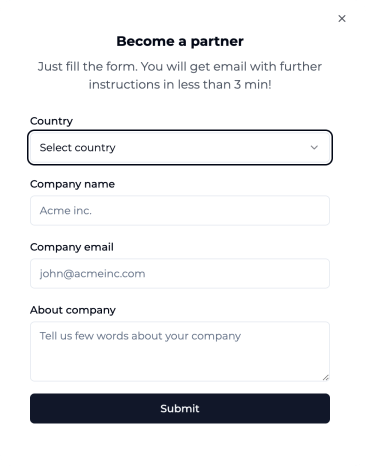
Once the form is submitted, we create your partner account and issue your
SANDBOXandPRODUCTIONAPI keys — you will access them in the Partner Panel in the next steps. -
Login to Partner Panel portal
Log in to the partner panel with the email you specified – Partner Panel
If you are a business owner and you have a developer who will perform the integration, add him in the Profile -> Settings -> Members
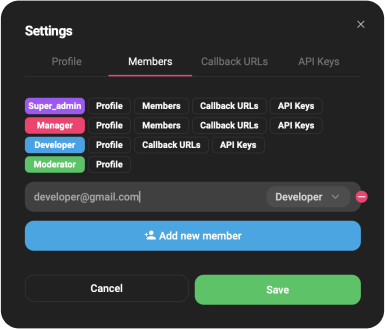
-
Select type of integration
Please navigate to the corresponding tab in Partner Panel based on the integration type you’ve selected and follow the relevant documentation provided:
API documentation you can find on this link - API Integration 📄
Widget documentation you can find here - Widget Integration 📄
Iframe documentation you can find here - Iframe Integration 📄
-
Configure webhook & redirect URLs
In the Partner Panel open Profile → For Developers and set up how you receive order updates and where customers return after payment:
- Webhook URL — we notify you on every order status change
(
CREATED,COMPLETED,FAILED,REFUNDED). Details — Webhooks 📄 - Success redirect URL / Error redirect URL — where the customer is redirected after a successful or cancelled payment.
Your
SANDBOXandPRODUCTIONAPI keys live in this same section — make sure you use the correct one. More details — Partner Panel 📄 - Webhook URL — we notify you on every order status change
(
-
Generate your draft cooperation agreement
Open the Revenue Calculator 🧮, choose your configuration (payment model and revenue share) and download the pre-filled draft cooperation agreement. Your selections are summarised in Annex 1 — Selected Configuration.
The draft must be reviewed and confirmed by both parties before signing — the figures are not final until agreed.
-
Pay the Security Deposit
Before going live, pay the refundable Security Deposit shown in the Revenue Calculator for your chosen payment model:
- EUR 1,000 — when Vignette ID acts as the payment processor (covers End-User refunds we process on your behalf).
- EUR 3,000 — when you collect retail payments directly.
The deposit is fully refundable and returned on termination of the cooperation.
-
Your production API key is activated 🎉
Congratulations! Once the deposit is received and the agreement is signed, your
PRODUCTIONAPI key is activated and you are ready to serve real orders.